Moch

Your own AI. In your pocket.

Moch is a free, open-source phone app for your hermes agent — the AI agent running on your own computer. One command links it, one QR pairs your phone: no accounts, no monthly fee.

curl -fsSL https://moch.softland.tech/install.sh | bash

Already running hermes on your Linux machine? That's the whole setup.

Open source, MIT — even the relay Works from any network Your data stays on your machine Official relay free while Moch is new
Moch streaming an answer with its thinking visible

Two ways in

Pick the line that matches your machine — both end with a QR on your screen.

Recommended

Already running hermes

One command on your Linux machine. moch-link never installs, configures or modifies hermes — it connects your install to the official relay and prints the QR.

curl -fsSL https://moch.softland.tech/install.sh | bash
  • Sessions, providers and skills are already there
  • Works from any network — outbound-only, the relay stores token hashes
  • Your data never leaves your machine

Starting fresh

No hermes yet? Install the agent itself (one command, from the hermes project) — then link it with the same line as above.

curl -fsSL https://hermes-agent.nousresearch.com/install.sh | bash
  • Then: curl -fsSL https://moch.softland.tech/install.sh | bash
  • The real hermes — the same agent upstream, nothing forked or wrapped
  • Works on Linux, macOS, WSL2 and Termux

Both end the same way: a QR on your screen, a scan, and your agent in your pocket.

Open source, end to end

Moch is three MIT pieces — the app, the link, and the relay that connects them. Every one of them can run on hardware you own.

Run the whole stack yourself

The app is open source, moch-link is one script, and the relay is a single Node file you can host anywhere. Self-host the relay and there is no third party in the loop at all — not even us.

  • The relay's source and deploy guide — same code ours runs
  • Point moch-link at it with MOCH_LINK_RELAY=wss://your-relay …
  • Your machines, your keys, your rules — MIT, forever

Or use ours — free while Moch is new

Don't want to host anything? The official relay at api.moch.softland.tech is the default, and it's free for everyone right now, so you can just try Moch.

  • No account, no signup, nothing to configure — it's already in the QR
  • It routes by token hash and stores no traffic
  • Self-hosting stays free forever — that's the point of open source

Why not just message a bot on Telegram?

Honest question. The Hermes gateway even ships a Telegram bot, and it's a fine way to start. Here's what changes when the phone gets an app of its own.

A bot inside a chat app

Your messages ride a platform on the way home.

WHERE MESSAGES GOPhone, then the chat platform's servers, then your agent.
WHAT AN ANSWER LOOKS LIKEPlain text in a bubble.
WHEN IT NEEDS PERMISSIONYou answer in a plain text reply.
CHANGING A SCHEDULED JOBType the right slash command, syntax and all.
WHAT IT COSTS YOUAn account and a bot token on someone else's platform.

Moch

A direct line to your own machine.

WHERE MESSAGES GOFrom your phone to your computer. The relay, if you use one, just passes the call along — it stores nothing but a token hash.
WHAT AN ANSWER LOOKS LIKEThinking you can open, code that's formatted, lists that are lists.
WHEN IT NEEDS PERMISSIONA card arrives. Tap Allow or Deny.
CHANGING A SCHEDULED JOBAn Automations screen with switches, not syntax.
WHAT IT COSTS YOUNothing. Your device, your server, that's the whole relationship.

Both are front doors to the same agent, and you can happily run them side by side. Moch is for when your phone deserves better than a text box.

What it feels like to use

Not promises: the actual things the app puts on your screen.

You watch it think

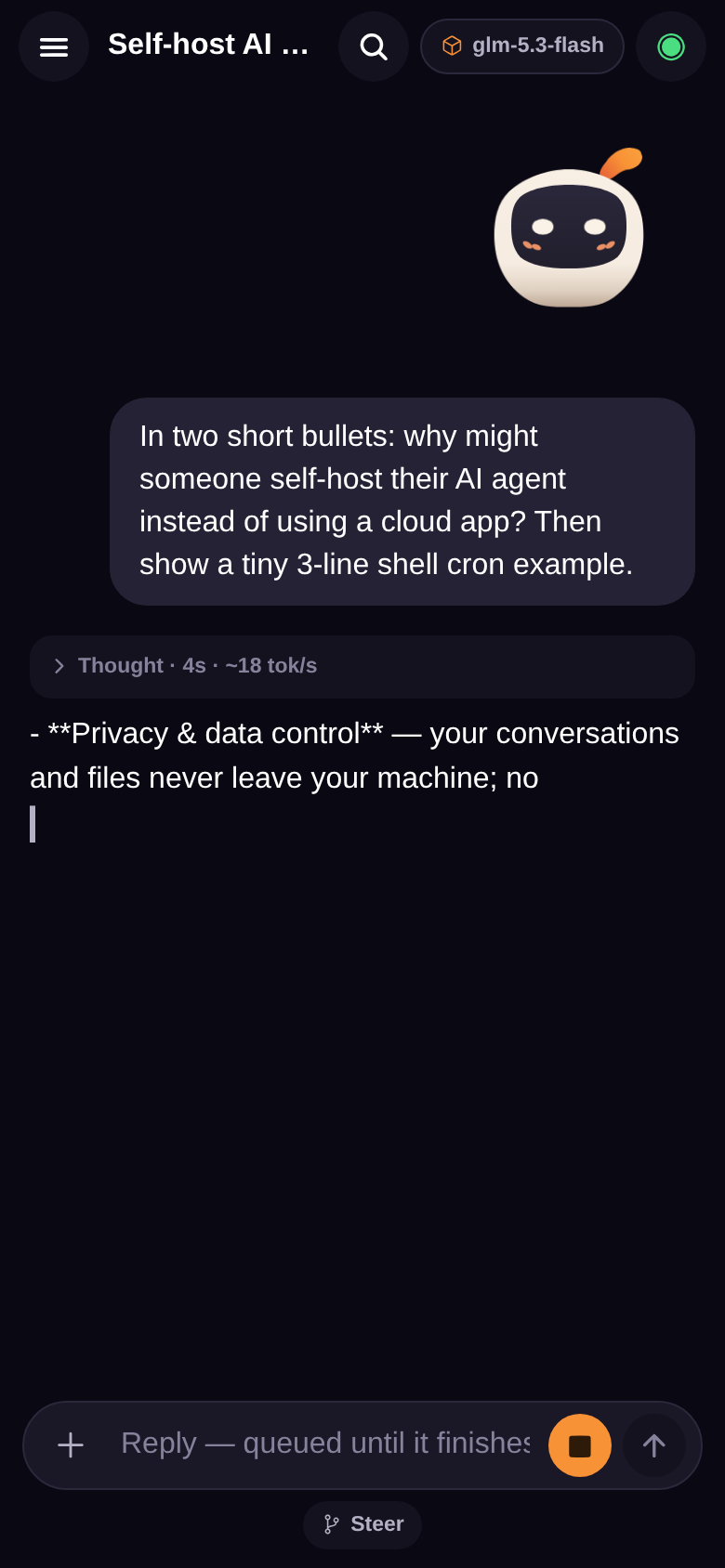
Answers stream in word by word. When the agent reasons first, the thinking sits in a little chip you can open, with how long it took and how fast it read. Nothing is hidden, nothing is noisy.

Moch deep in thought Thinking · 14s · 23 tok/s

A live reply, mid-thought

Permission is a tap, not a reply

When your agent wants to install something, spend something, or touch something sensitive, a card comes to your phone. Approve it from the kitchen. The question waits politely if you're in another chat.

Moch asking for your approval
Install 2 packages?
Your agent wants to add requests and rich to its Python environment.
AllowDeny

An approval, as it actually arrives

Chores it runs while you sleep

Set a job once ("every evening at six, summarize what changed in my repo") and the agent runs it on your computer even with the app closed. Pause it, edit it, run it now: switches, not commands.

Evening repo digestevery day · 18:00

One automation, on duty

Two computers, one app

Pair your desk and your laptop, even the same machine twice, once for home and once for the road. Moch remembers them all and reconnects to the last one on its own.

DeskCONNECTED
LaptopPAIRED
Desk (relay)PAIRED

Settings, your computers list

Every skill your agent has

Type a slash and Moch asks your agent what it can do (commands, skills, models), straight from the source. Your agent learns a new trick tonight, your phone knows it tonight. No app update needed.

/model glm-5.3-flash
/reasoning low · medium · high
/cron add · list · pause

The catalog, served by your agent

Moch celebrating

An evening project. Yours forever.

Already running hermes? moch-link is one command. Starting fresh? The full backend installs everything. The setup guide walks either door: put Moch on your phone, scan one code.

Start the setup guide